문제 정보
The CAN traffic message appears to be encrypted.
Can you help me decrypt it using my key and IV?
IV: 3809168903286241
Key: 9170207685066913
This challenge is accessible via the VicOne xNexus tool
Flag Format hint: bh{the_flag}
문제 풀이 요약
- VicOne xNexus 페이지의 OAT Event에서 Suspicious CAN Bus Message Content by payload Fingerprint Model으로 된 데이터 확인
- 데이터 내 CAN_Frame를 추출하고 시간 순으로 정렬하여 확인
- CAN_ID 0x123의 데이터를 수집하고 중복된 데이터를 제거하여 8개의 개별 프레임 확보
- 8개의 프레임을 순열을 통해 40320가지 긴 암호문을 만들고 AES CBC 모드로 복호화
- 복호화 데이터 내에 flag 문자열 확인
문제 풀이 상세
1. 문제에서는 key와 IV를 제공하며 챌린지 명과 IV로 AES CBC 모드라는 걸 추측할 수 있습니다.
• IV : 3809168903286241
• Key : 9170207685066913
2. CAN 트래픽을 확인하기 위해선 제공된 VicOne의 xNexus 서비스의 OTA Event 기능을 이용합니다.
• OTA Event 내 Suspicious CAN Bus Message Content by payload Fingerprint Model 데이터에는 CAN Frame이 존재하며 해당 데이터 위주로 추출합니다.
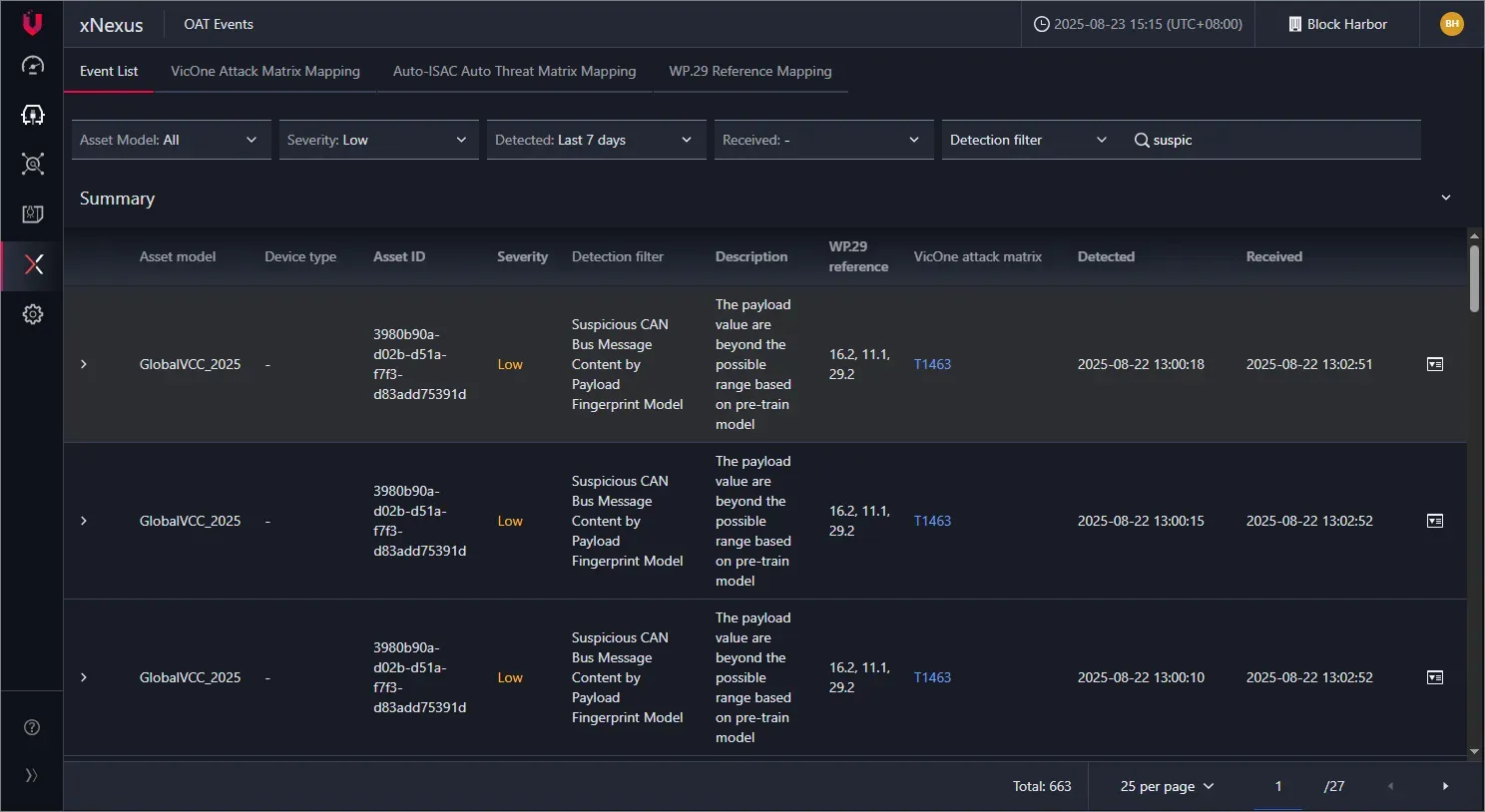
• 데이터에는 log_content → canReasons → payload_fingerprint_violation_reason 내에 can_id와 can_frame을 찾을 수 있습니다.
...
"data": {
        "detection": [
            {
                "id": "9135826",
                "vehicle_id": "3980b90a-d02b-d51a-f7f3-d83add75391d",
                "device_id": "3980b90a-d02b-d51a-f7f3-d83add75391d",
                "device_type": "",
                "model_name": "GlobalVCC_2025",
                "log_content": "{\"processFileHashSha256\":\"\",\"canReasons\":\"{\\\"payload_fingerprint_violation_reason\\\": [\\\"can_id\\\": 0x000001ff, \\\"can_frame\\\": \\\"454e44464c414731\\\", \\\"hit\\\": true}]}\",\"modelId\":\"GlobalVCC_2025\",\"srcSigner\":[\"\"],\"objectGroup\":\"\",\"uuid\":\"25943dcb-8fa2-4a97-9d4c-64f63a70d059\",\"requestWrsCategory\":\"\",\"objectType\":\"\",\"srcFileHashSha256\":\"\",\"endpointHostName\":\"xCarbon\",\"objectFileHashSha256\":\"\",\"mpver\":\"xCarbon Sensor/5.8.4\",\"processName\":\"\",\"eventName\":\"CAN_BUS_ANOMALY_EVENT\",\"objectFileHashMd5\":\"\",\"action\":\"DETECT\",\"filterRiskLevel\":\"low\",\"parentFilePath\":\"\",\"packagePath\":\"s3://vicone-log-receiver-dc3stg/customer=8a29dfc4-aa15-4fdf-9c6d-603bbf6ffe8b/type=detection_log/year=2025/month=08/day=22/hour=05/2025-08-22T05:00:25.442Z_xcarbon_3980b90a-d02b-d51a-f7f3-d83add75391d_1755838825110.pb\",\"deviceType\":\"\",\"eventId\":\"100134\",\"policyName\":\"\",\"ecuModel\":\"GlobalVCC_2025\",\"objectFilePath\":\"\",\"pname\":\"armv8_rpi\",\"srcFileHashMd5\":\"\",\"eventSourceType\":\"EVENT_SOURCE_EVENT_LOG\",\"patVer\":\"\",\"parentFileHashMd5\":\"\",\"ecuId\":\"\",\"version\":\"1.0\",\"srcFilePath\":\"\",\"tags\":[\"XSAE.VSOC027\",\"WP29.ANNEX5.E29.2\",\"ATM-T0003\",\"WP29.ANNEX5.E16.2\",\"MITREV8.T1463\",\"WP29.ANNEX5.E11.1\"],\"requestWrsRating\":\"\",\"eventSubName\":\"FINGERPRINTS\",\"canIds\":[\"1ff\"],\"parentName\":\"\",\"objectModuleName\":\"\",\"canEventDetector\":\"FINGERPRINT_VIOLATION\",\"customEndpointId\":\"\",\"objectFileHashSha1\":\"\",\"objectHostName\":\"\",\"srcGroup\":\"\",\"hostName\":\"\",\"request\":\"\",\"rt\":\"2025-08-22T05:00:18+0000\",\"objectCurrentOwner\":\"\",\"riskLevel\":\"\",\"eventSummary\":\"Fingerprint anomaly on CAN ID: 0x000001ff\",\"objectOwner\":\"\",\"objectCmd\":[\"\"],\"subRuleId\":\"203f0f4a-b2b6-4fce-84fe-2f3fad60b84e\",\"objectAppName\":\"\",\"canRawDataStr\":\"{\\\"highlightedMessages\\\": []}\",\"objectRequest\":\"\",\"deviceGUID\":\"3980b90a-d02b-d51a-f7f3-d83add75391d\",\"endpointMacAddress\":\"d8:3a:dd:75:39:1d\",\"parentCmd\":\"\",\"ruleType\":\"\",\"eventTime\":\"1755838818000\",\"customerId\":\"8a29dfc4-aa15-4fdf-9c6d-603bbf6ffe8b\",\"objectDomain\":\"\",\"srcFileHashSha1\":\"\",\"packageTraceId\":\"xcarbon_3980b90a-d02b-d51a-f7f3-d83add75391d_1755838825110\",\"ruleName\":\"\",\"endpointGUID\":\"3980b90a-d02b-d51a-f7f3-d83add75391d\",\"vehicleId\":\"3980b90a-d02b-d51a-f7f3-d83add75391d\",\"objectContentName\":\"\",\"direction\":\"\",\"processFileHashMd5\":\"\",\"processCmd\":\"\",\"customGroupId\":\"\",\"endpointIp\":[\"10.20.50.218\",\"fe80::45f5:5684:8979:d485\"],\"objectTargetProcess\":\"\",\"processFilePath\":\"\",\"canParentDetector\":\"FINGERPRINTS\",\"policyUuid\":\"\",\"engVer\":\"\",\"productCode\":\"sis\",\"mpname\":\"VicOne xCarbon Sensor (SNR)\",\"policyId\":\"\",\"ruleCat\":\"\",\"parentFileHashSha1\":\"\",\"parentFileHashSha256\":\"\",\"processFileHashSha1\":\"\",\"receivedTime\":\"1755838825442\",\"objectName\":\"\",\"objectApiName\":\"\",\"category\":\"\",\"threatAndAttack\":\"\",\"rtUtc\":\"2025-08-22T05:00:18Z\"}",
                "event_uuid": "25943dcb-8fa2-4a97-9d4c-64f63a70d059",
                "log_type": "can",
                "tags": [],
                "detected_time": "2025-08-22T05:00:18Z",
                "received_time": "2025-08-22T05:02:51.599Z",
                "network_extra_info": {
                    "category": "",
                    "action": "detect",
                    "threat": ""
                },
                "attack_vector_fields": [],
                "filters": [
                    {
                        "id": 15119,
                        "filter_id": "203f0f4a-b2b6-4fce-84fe-2f3fad60b84e",
                        "display_id": "VSOC027",
                        "title": "Suspicious CAN Bus Message Content by Payload Fingerprint Model",
                        "description": "The payload value are beyond the possible range based on pre-train model",
                        "level": "low",
                        "mitre_ids": [
                            "mitre:v8:techniques:t1463"
                        ],
  ...
• can_id, can_frame과 더불어 시간 값 등을 추출하여 다음과 같이 데이터를 정리할 수 있습니다.
3. 해당 로그를 사용하는 문제는 총 2문제이며 0x11X 범위의 can id는 [#1 Red Alert] 문제에서 사용되므로 0x123 can id에 집중합니다.
• 0x123 can id 은 꽤 많은 값들이 존재했으며 시간 순서 정렬이나 Id 정렬 등으로는 답을 찾을 수 없었습니다.
• 0x123 can id 의 frame에는 반복되는 값들이 존재했으며 중복을 제거하면 8개의 값으로 추려집니다.
'4778505554616547', '364c4f356848726a', '4c4e345543573133', '397a4f64554b6132', '6c58444b464a5a65', '7265723176434367', '344b4f6f6a685055', '6d736a67444e7072'
4. 8개의 값으로 만들 수 있는 모든 경우의 수로 순서를 지정하여 암호문을 만들고 base64 디코딩을 수행하며 주어진 key와 iv로 AES CBC 복호화를 진행합니다.
import itertools
from Crypto.Cipher import AES
import base64

data = [
    '4778505554616547',
    '364c4f356848726a',
    '4c4e345543573133',
    '397a4f64554b6132',
    '6c58444b464a5a65',
    '7265723176434367',
    '344b4f6f6a685055',
    '6d736a67444e7072'
]

key = b"9170207685066913"  # 16 bytes ASCII
iv  = b"3809168903286241"  # 16 bytes ASCII

def decrypt(cipher_bytes):
    cipher = AES.new(key, AES.MODE_CBC, iv)
    return cipher.decrypt(cipher_bytes)


f = open("./output.txt", "w", encoding='utf-8')

for perm in itertools.permutations(data):
    hex_str = "".join(perm)

    # hex to bytes
    raw_bytes = bytes.fromhex(hex_str)
    b64_decoded = base64.b64decode(raw_bytes, validate=True)

    plain = decrypt(b64_decoded)

    f.write(plain.decode("utf-8", "ignore"))
5. 복호화된 파일에서 flag format인 'bh{'를 검색하면 flag를 찾을 수 있습니다.
• Flag: bh{y0u_d3crypt3d_AES_c0rr3ctly}

'CTF' 카테고리의 다른 글
| [Global Vehicle Cybersecurity Competition 2025] #1 Wired Keyless Entry [PowerPC] Write-Up (0) | 2025.09.14 |
|---|---|
| [Global Vehicle Cybersecurity Competition 2025] #3 Firmware Reveal Write-Up (0) | 2025.09.14 |
| [Global Vehicle Cybersecurity Competition 2025] #1 Red Alert Write-Up (0) | 2025.09.14 |
| [Global Vehicle Cybersecurity Competition 2025] 참여 후기 (0) | 2025.09.14 |
| [Dream Hack] xss-2 풀이 (0) | 2022.09.07 |